


Introduction
A contact center opens on Monday with eight agents when it needs fourteen. Calls back up, customers hang up, and by Thursday the same center is overstaffed and paying for idle time.
That gap between the people you have and the work in front of you is what workforce management exists to close.
So, what is workforce management? It's the set of processes and tools a business uses to put the right number of people, with the right skills, on the right work at the right time. In practice, that means forecasting demand, building schedules, tracking time, handling absences, and staying compliant with labor rules.
This guide covers how the process works, its core components, real examples, and what to look for in software.
TL;DR
- Workforce management (WFM) matches staffing levels and skills to actual demand, day by day and week by week.
- The process runs in a loop: forecast demand, schedule people, track time, manage absences, then measure and adjust.
- Core components include forecasting, scheduling, time and attendance, leave management, and compliance.
- WFM is operational and short-term, which separates it from long-range workforce planning and talent management.
- Good WFM software helps, but it only works when the data going in is accurate and managers act on it.
What is workforce management?
Here's a simple workforce management definition: WFM is how an organization makes sure it has enough of the right people working when the work needs doing, at a cost it can afford.
The term came from shift-heavy industries. It started in contact centers and other service businesses with large numbers of hourly workers, where a few too many or too few people on a shift has an immediate cost.
Today it applies to any organization that schedules people against changing demand, including hospitals, retailers, logistics firms, and IT services teams.
Gartner tracks WFM as its own software market, with separate categories for areas like contact center workforce management solutions and retail workforce management applications. That split tells you something useful.
WFM looks different depending on the work, but the basic job stays the same.
How the workforce management process works
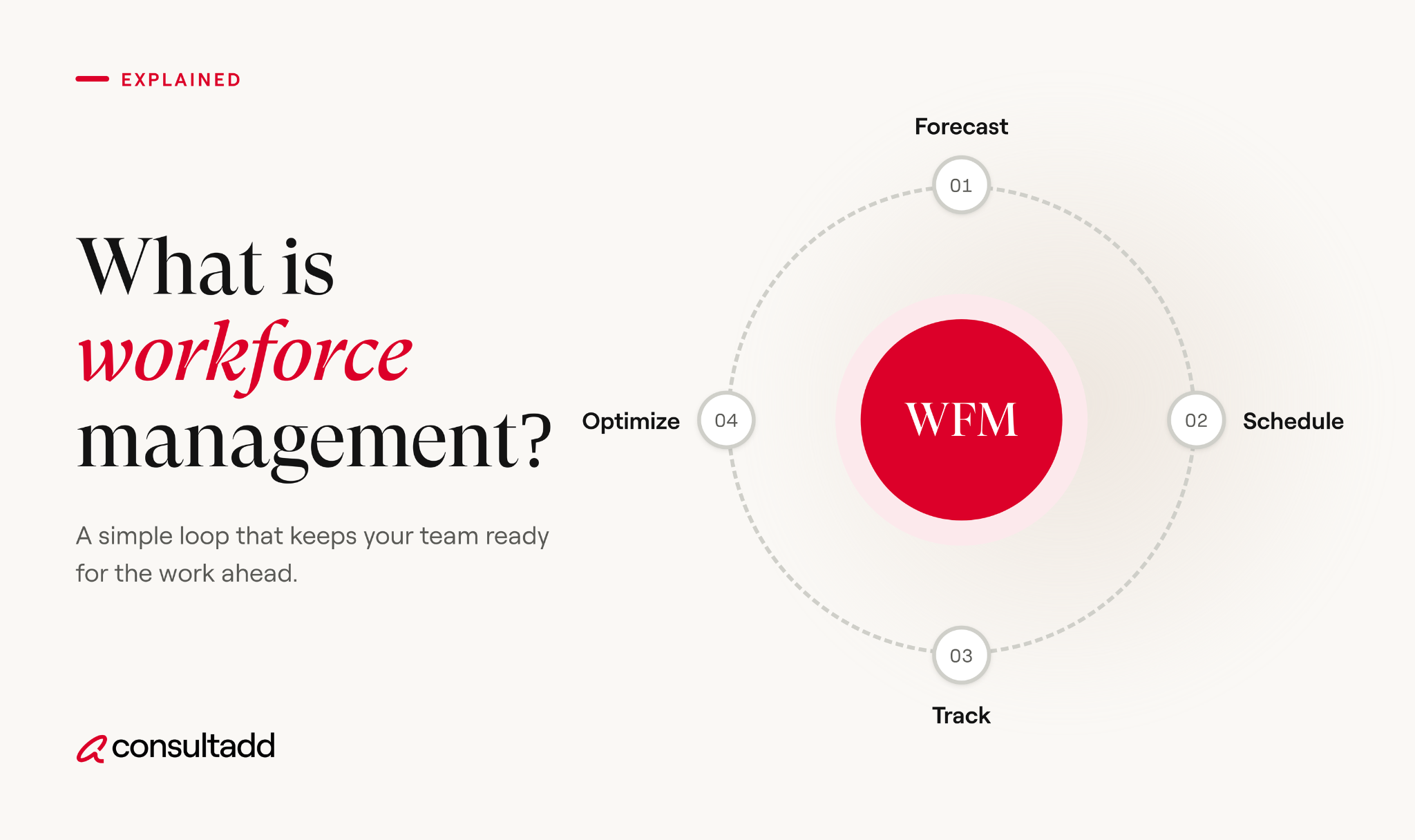
The workforce management process is a cycle, not a one-time project. Each round feeds data into the next.
1. Forecast demand
Start by estimating how much work is coming. A contact center looks at call volume by hour. A retailer looks at foot traffic and sales. An IT services team looks at project pipelines and ticket volume.
Historical data is the usual starting point, adjusted for seasonality, promotions, product launches, and known events.
2. Build schedules
Turn the forecast into shifts or assignments. A good schedule covers demand, respects skills and certifications, follows labor rules, and accounts for employee availability and preferences.
This is where most of the tradeoffs happen. Covering every peak perfectly usually means paying for slack somewhere else.
3. Track time and attendance
Record when people actually work. This feeds payroll, shows where schedules and reality drifted apart, and creates the records labor law requires.
4. Manage leave and absences
Handle time-off requests, sick days, and no-shows. The goal is to approve leave with a clear view of how it affects coverage, instead of discovering the gap on the day.
5. Measure and adjust
Compare forecast to actual demand, and schedule to actual attendance. Then feed what you learned into the next forecast. Teams that skip this step tend to repeat the same staffing mistakes every quarter.
Core components of workforce management
Gartner breaks WFM software into five core functions: labor scheduling, time and work data collection, leave management, task and activity management, and time and attendance.
Most organizations add forecasting and compliance on top. Here's how the components of workforce management fit together.
Workforce management vs workforce planning vs talent management
These three terms get mixed up a lot, and they answer different questions.
Workforce management works inside the boundaries of the other two sets.
If you want the long-range view, our guide on what strategic workforce planning is and how to build a plan covers it in depth.
For hiring, development, and retention, see our strategic talent management framework.
Benefits of workforce management
The benefits of workforce management show up in a few concrete places.
Labor costs become more predictable. Overtime, idle time, and last-minute contractor spend all drop when schedules match demand more closely.
Service gets more consistent. Customers wait less when staffing tracks peak hours instead of a flat average.
Compliance risk goes down. Accurate time records and automated rule checks make it harder to miss overtime, breaks, or required records.
Employees often have a better week, too. Fair schedules posted in advance, easier shift swaps, and fewer surprise double shifts reduce burnout. That said, WFM done badly, with rigid schedules and no input from staff, can push turnover the other way.
Workforce management examples by industry
Workforce management examples look different by industry, but they all deal with the same tension between demand and cost.
Contact centers forecast call and chat volume in 15 or 30-minute intervals and schedule agents to match. They track schedule adherence closely, because one late lunch break can stretch wait times.
Retail schedules store associates around foot traffic, deliveries, and promotions. Many retailers also plan tasks like restocking for quieter hours.
Healthcare has to meet minimum staffing ratios and match credentials to every shift. A schedule that looks fine on headcount can still fail if the right certifications aren't on the floor.
IT services and consulting apply WFM to projects rather than shifts. The question is whether you have enough engineers with the right skills when a project kicks off, and what happens to them when it ends.
This is where contract and contract-to-hire talent often fill the gap between steady demand and spikes.
Common workforce management challenges
Bad data is the most common problem. A forecast built on incomplete history or messy time records produces confident-looking schedules that are wrong.
Compliance is the next one. In the U.S., the Fair Labor Standards Act requires covered employers to keep records for each non-exempt worker, including hours worked each day and total hours each workweek.
The U.S. Department of Labor's Fact Sheet #21 lists what those records must include. State and local rules, like predictive scheduling laws, add more layers.
Other common challenges include:
- Managing a mixed workforce of full-time employees, contractors, and remote staff in one view
- Skills gaps that make headcount look fine while key roles stay uncovered
- Managers overriding schedules informally, so the system no longer reflects reality
- Tools that don't integrate with payroll or HR systems
Skills gaps deserve a closer look, since they hide inside healthy-looking numbers.
Our post on understanding the skill gap and how to address it goes deeper on this.
How to choose workforce management software
Workforce management software ranges from simple scheduling apps to full suites built into HR platforms. The right choice depends on your workforce size, shift complexity, and compliance needs. Use this checklist when comparing options.
Run a pilot with one team before rolling out company-wide. Problems with data quality and manager habits show up fast in a small pilot and are much harder to fix at scale.
Where staffing partners fit into workforce management
Even a strong WFM program runs into moments where the forecast says you need people you don't have. A new client project lands, a key team member resigns, or demand spikes faster than internal hiring can move.
That's the gap staffing partners fill. In our work with IT and staffing clients, the requests that land on our desk usually follow a WFM signal: a forecast showing a skills shortfall six weeks out, or a project start date that internal recruiting can't meet.
Teams that track that data well tend to call earlier, which gives everyone more time to find the right fit.
Contract-to-hire is a common middle ground here. It lets you cover immediate demand and evaluate someone before committing long term.
Our breakdown of contract-to-hire pros and cons explains when it works and when it doesn't.
Conclusion
What is workforce management, in one line? It's the ongoing work of matching people to demand, and then checking whether you got it right.
Start small if you're building it from scratch. Clean up your time and attendance data, compare last quarter's schedules to actual demand, and fix the biggest mismatch first. Software helps you scale, but the habit of measuring and adjusting is what makes WFM work.
Start Strong With Consultadd
With 15 years in business and 5,000+ successful staffing engagements, we don't just fill roles, we build reliability into your process. We've supported 65 staffing companies in the past year alone and maintain MSAs with industry leaders like Robert Half and TEKsystems.
Here's what working with Consultadd looks like:
- Talent sourced in under 24 hours
- Ready-to-deploy candidates, vetted for experience and compliance
- Lower turnover risk: we match long-term goals, not just short-term needs
- Seamless compliance: visa, documentation, onboarding? Handled.
- Dedicated 1:1 account managers for responsive, personalized support
- Top 100 candidate matches delivered in the past year
- Strong partnerships with universities to tap into fresh, committed talent
- Post-placement support so your investment grows beyond day one
For candidates, your next opportunity is more than just a job title, it's a chance to build skills, gain experience, and move your career forward. At Consultadd, we connect technology professionals with projects and employers that align with their goals, whether they're looking for contract, contract-to-hire, or long-term opportunities.
The tech job market moves fast, but the right guidance can make all the difference. Ready to take the next step in your career journey? Explore Opportunities >>
Key takeaways
- Workforce management keeps staffing levels and skills matched to real demand.
- The process is a loop of forecasting, scheduling, time tracking, leave management, and adjustment.
- WFM is short-term and operational, unlike strategic workforce planning or talent management.
- Accurate time data and labor law compliance sit at the center of any WFM program.
- Staffing partners and contract-to-hire models help when demand outpaces internal hiring.
FAQs
1. What does a workforce management team do?
A WFM team forecasts workload, builds schedules, monitors adherence during the day, and reports on staffing performance. In larger organizations, the team often splits into forecasters, schedulers, and real-time analysts. They work closely with operations managers and payroll.
2. Is workforce management part of HR?
It overlaps with HR but usually sits in operations. HR owns hiring, policies, and employee relations, while WFM focuses on daily staffing and scheduling. The two share data, especially for time tracking, leave, and payroll.
3. What is WFM in a call center?
In a call center, WFM means forecasting contact volume in short intervals and scheduling agents to meet service-level targets. Teams also track schedule adherence in real time and shift breaks or tasks when volume changes unexpectedly.
4. What skills does a workforce manager need?
Strong analytical skills come first, since forecasting relies on data and basic statistics. A workforce manager also needs to understand labor rules, use WFM software well, and communicate schedule changes clearly to managers and staff.
5. Does workforce management apply to contract and remote workers?
Yes. Many organizations now track contractors, remote employees, and on-site staff in the same system. The tracking rules and legal obligations can differ by worker type, so check classification and recordkeeping requirements for each group.
6. Can small businesses benefit from workforce management?
They can, often with simple tools. A small business with hourly staff gains a lot from basic scheduling software and accurate time tracking. Full enterprise WFM suites usually only make sense once shift complexity or headcount grows.
.png)

.png)

.webp)